Beautiful Script Font for Web Design
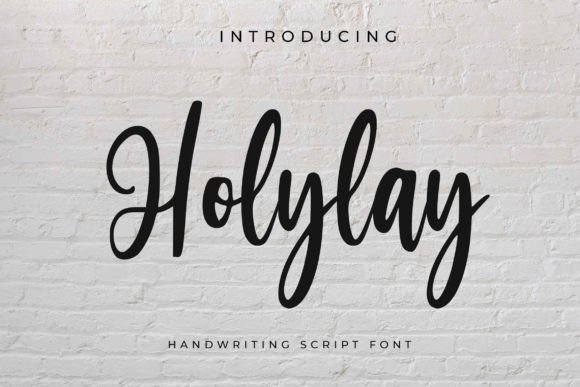
As a web designer, I’m always on the lookout for fonts that bring personality and visual interest to digital projects. Holylay, a premium handwritten font from the Script Amp collection, has quickly become one of my go-to choices for adding a touch of elegance and warmth to website layouts.
A Handwritten Touch for Digital Branding
Testing Holylay in a hero section of a boutique online store was the perfect way to see how it performed in a real-world scenario. The font’s dainty and delicate characters brought a soft, inviting feel to the page. It worked especially well as a headline over a background image, where its flowing curves added a sense of movement and artistry without overwhelming the design.
What stood out was how Holylay maintained its charm across different screen sizes. On mobile devices, it remained legible and expressive, making it ideal for call-to-action buttons or short promotional text. Its subtle swashes and ligatures gave it a handcrafted feel, which is perfect for brands aiming to convey authenticity and creativity.
Perfect for Display Typography
When used in headers and section titles, Holylay adds a unique visual identity that sets a site apart from more generic sans serif or serif fonts. I tested it on a portfolio homepage, where it served as the main title for a creative project. The font’s organic flow complemented the artistic nature of the work, creating a cohesive and memorable visual experience.
It also shone in landing pages for a coaching business. As a heading for a course sales page, it drew attention without being too bold or distracting. Pairing it with a clean sans serif font for body copy created a balanced look that felt both professional and approachable.
Responsive Design and Readability
One of the key concerns when using decorative fonts like Holylay is readability, especially on smaller screens. In my tests, the font held up well on mobile devices, but I found that it works best for short phrases rather than long paragraphs. For example, using it for a blog header or a product banner was effective, but it wasn’t suitable for body text or dense information sections.
I also tested Holylay on dark and light backgrounds. On a dark backdrop, it had a nice contrast that made it stand out without appearing harsh. On a light background, it retained its softness, which made it great for overlays on images or video banners. However, I noticed that in some cases, the thin strokes could be harder to read at smaller sizes, so I recommend using it for larger text elements only.
Font Pairing for Web Projects
When working on a digital brand kit, I paired Holylay with a simple sans serif font for body copy. This combination allowed the script font to shine as a display element while keeping the rest of the design clean and easy to read. It also worked well with a classic serif font for a more editorial feel, giving the site a timeless and sophisticated look.
For a product landing page, I used Holylay as a subheading alongside a bold display font for the main CTA. The result was a dynamic yet cohesive layout that guided users through the content without feeling cluttered.
Considerations for Web Use
While Holylay is excellent for headlines and decorative accents, it’s not the best choice for small navigation text or form labels. Its intricate details can become lost in tight spacing, which could affect usability. For these elements, a more structured font would be a better fit.
Another consideration is accessibility. If a site relies heavily on Holylay for critical information, it may not be the most accessible choice for users with visual impairments. That said, using it sparingly as a design element rather than a primary text font helps maintain clarity and inclusivity.
Before implementing Holylay on a live site, I always check the available styles, weights, and file formats. The font comes in multiple variations, which makes it versatile for different design needs. It also includes alternates and ligatures that add depth and character to the typography, making it a valuable addition to any digital toolkit.
Final Thoughts on Holylay
Overall, Holylay is a standout font for web designers looking to add a personal and artistic touch to their projects. Its elegant, dainty style makes it ideal for headers, logos, and decorative elements, while its responsiveness ensures it performs well across devices. Whether you're building a creative portfolio, an online store, or a marketing campaign, Holylay brings a unique visual flair that enhances the overall user experience.